welcome
we're Starlelab — an independent indie studio. everything in the game was built from scratch. we're still a small team, but you can change that: gplyno@gmail.com
 starlelab
we're Starlelab — an independent indie studio. everything in the game was built from scratch. we're still a small team, but you can change that: gplyno@gmail.com
Zombotanic is a survival RPG set in a world where nature has become corrupted.
Explore a dangerous world, gather resources, build your shelter, and fight against the growing zombie infection.
Combine different playstyles with RPG progression, roguelike elements, and survival mechanics. Every journey is different, and every decision can determine how long you survive.
The game is currently in early development, but there is much more to come. We are actively improving Zombotanic and listening to player feedback.
A free local music player built with Qt 6.



SoundHub is a lightweight desktop application for listening to your local music collection. The interface is intentionally simple and focused on essential playback controls.
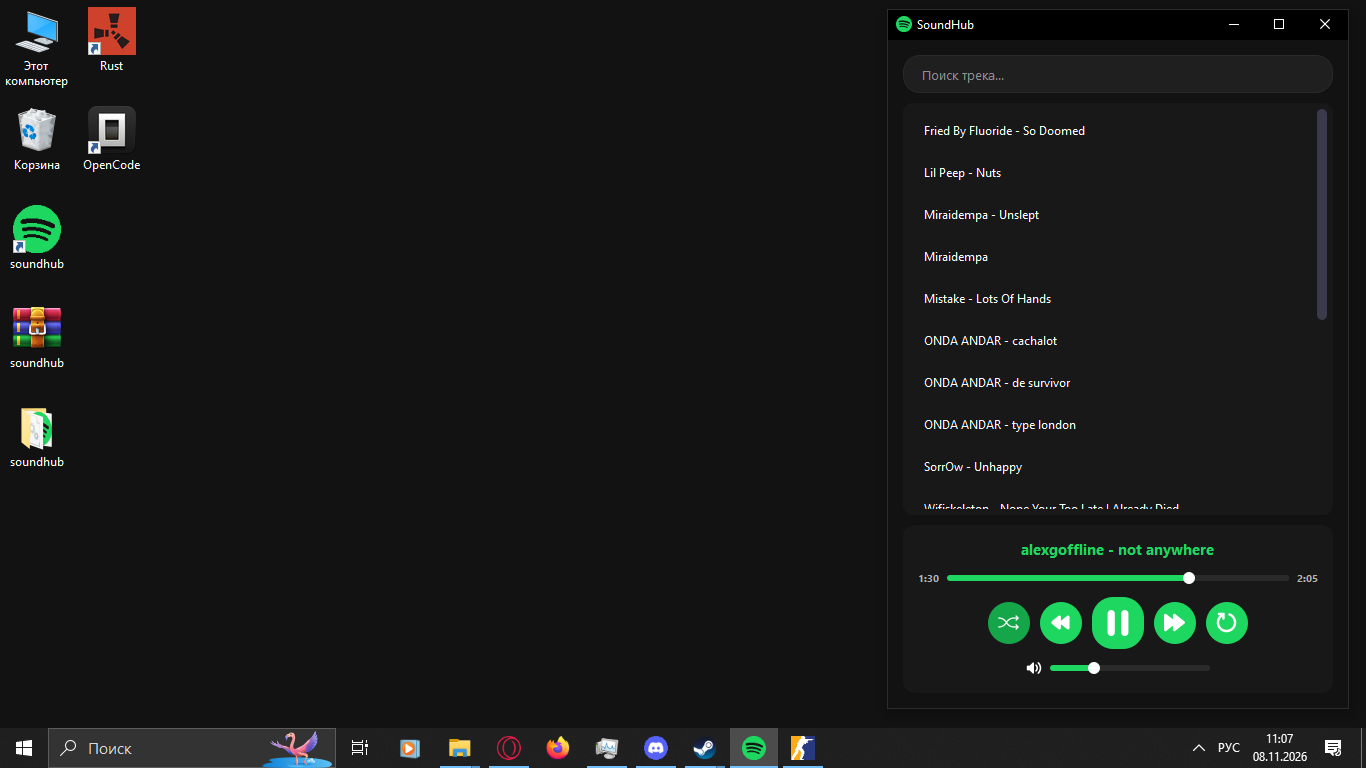
You might notice that the interface is inspired by modern streaming services like Spotify. We believe that a familiar UI is an intuitive UI. However, SoundHub was built to solve a different set of problems:
.exe)..exe, find the music folder..mp3 files or other supported audio files into that folder.SoundHub does not distribute music. You must download your own music files.
This project is licensed under the MIT License. See the LICENSE file for details.
SoundHub was developed by starlelab in 2026.
Website: https://gplyno.github.io/starlelab/
GitHub: https://github.com/gplyno/soundhub
as we've said, we're a small studio. but we'll strive to create a great game - one that people will want to play for a long time.
← back